AI writing tools that write in your own style
16 tools, one style engine. Pick the format you're writing — every draft comes back in your measured voice.
- LinkedIn postHooks and posts that sound like you, not like LinkedIn AI.
- Comments & repliesAuthentic replies at scale — your jokes, your phrasing.
- Email writerEmails in your tone — not corporate autopilot.
- Text rewriterRewrite any AI draft into your own writing style.
- Article & blogLong-form drafts that read like your byline.
- NewsletterIssues that sound like the person subscribers signed up for.
- X posts & threadsShort-form posts and threads with your cadence.
- Instagram captionsCaptions in your voice, not a template.
- Facebook postsPosts and group replies in your voice.
- Support repliesOne warm, consistent company tone in every reply.
- Cold outreachOutreach that reads like a person wrote it.
- Speeches & keynotesOpeners and scripts in the speaker's own voice.
- Product copyDescriptions in one consistent brand voice.
- Style translatorWrite in your language, publish in another — still in your voice.
- Style analyzerFree report: what your writing style actually measures.
- Banner style mimicTurn an ad you admire into a banner for your own product.
- Voice cloneSoonRead any text in your own cloned voice.
Free account · 5,000 words a month · We don't store your text
What StyleMimic is
StyleMimic is a suite of 16 AI writing tools that all run on one style engine. Instead of writing in a generic assistant voice, you paste something you already wrote — 40 words is enough — and the platform measures your sentence rhythm, punctuation habits and vocabulary into a style profile. Every tool then drafts in that measured voice and scores the result for style match and originality, so you can see how close it landed. A free account includes 5,000 words a month, and scanning a style costs nothing at all.
- Tools available
- 16 live text tools, one shared style engine
- Free allowance
- 5,000 words a month on a free account
- Sign-up to try
- Not required — the workspace runs without an account
- Minimum style sample
- 40 words; 300+ words for a reliable profile
- Format handling
- Each tool enforces its own length and character limits
- Scoring
- Every draft returns a style-match and an originality score
- Your data
- Samples power only your own drafts; never shared model training
- Paid plans
- Starter $9 and Pro $19 a month, plus top-up packs that never expire
How the suite works, in three steps
Step 1
Teach your voice once
Paste past posts, emails or articles. The engine measures them into a style profile with a strength score — no prompt engineering, no style descriptions to write.
Step 2
Pick the tool for the task
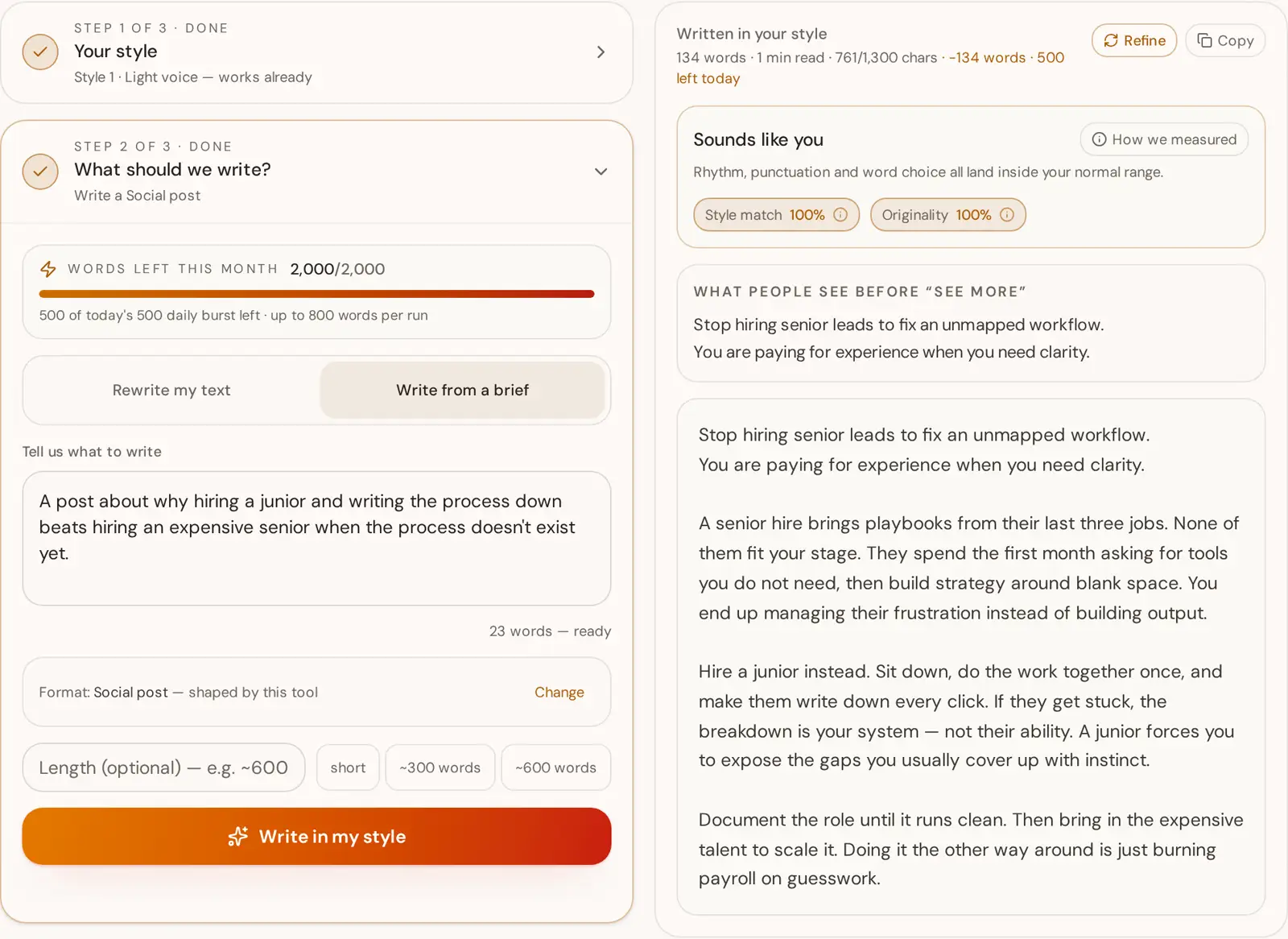
Each tool opens the workspace pre-configured for its format: the LinkedIn generator respects the 1,300-character cut, the X tool writes threads, the article writer holds a long-form structure.
Step 3
Get a scored draft
The draft comes back with a style-match score and an originality score, so you can judge it instead of guessing. Refine, shorten or regenerate from the same profile.
StyleMimic vs other AI writing tools
A category-level comparison — generic AI writers, humanizers and grammar assistants each solve a different problem. Check current features with any vendor before you decide.
| StyleMimic | Generic AI writers | AI humanizers | Grammar assistants | |
|---|---|---|---|---|
| Writes in your own measured voice | Yes — from a measured style profile | Only if you describe the voice in a prompt | No — rewrites toward a generic human register | No — corrects, does not adopt a voice |
| Shows a style-match score | Yes, on every draft | No | No | No |
| Shows an originality score | Yes — flags copied phrasing from your sample | No | No | Plagiarism add-ons on higher tiers |
| Per-format constraints | Yes — 16 tools with their own length and character caps | Prompt-dependent | None — format is whatever you pasted | None |
| Reusable saved voices | Yes — named profiles you can pick or blend | Sometimes, as brand-voice presets | No | Tone presets only |
| Free words on a free account | 5,000 words a month, no card | Usually a limited trial | Usually a character-capped trial | Free tier, limited rewrites |
Which tool should I use?
Find what you're trying to write and open the tool built for it.
- Turn a rough idea into a hook-first LinkedIn postLinkedIn post
- Reply to posts and comments without sounding like a botComments & replies
- Write a work email that reads like you sent itEmail writer
- Rewrite a draft so it keeps your voice, not the AI'sText rewriter
- Draft a blog article or long-form guideArticle & blog
- Write this week's newsletter issueNewsletter
- Post on X, or turn a note into a threadX posts & threads
- Caption an Instagram photo or carouselInstagram captions
- Write a Facebook post for a page or groupFacebook posts
- Answer a customer ticket kindly and clearlySupport replies
- Send cold outreach that gets a replyCold outreach
- Write a talk, keynote or toast to be spoken aloudSpeeches & keynotes
- Describe a product for a shop or listingProduct copy
- Make an ad banner or cover in an aesthetic you likeBanner style mimic
- Send an email or post in another language without sounding translatedStyle translator
- Measure how a piece of writing is builtStyle analyzer
What AI writing tools actually do — and where they fail
An AI writing tool takes an instruction and returns finished text: a post, an email, an article, a product description. Almost all of them are built on the same handful of large language models, which is why output from different tools reads so similar. The model has an average voice baked in, and unless something pushes it away from that average, it writes the average.
That average has tells. Sentences land in a narrow length band, so the rhythm never varies. Paragraphs open with a scene-setting clause and close with a tidy summarising line. Transitions repeat — moreover, in today's fast-paced world, it's not just about. Concrete detail gets replaced by category words. None of it is wrong, and all of it is recognisable, which is why so much AI-assisted writing gets skimmed past even when the argument is good.
The usual patch is a humanizer: run the output through a second pass that shortens some sentences, breaks some rules and adds hedges. That trades one generic register for another. It cannot sound like you because nothing in the loop ever measured how you write.
Style matching starts from the other end. Give the engine real samples of your own writing and it measures them: average sentence length and how much it varies, paragraph length, punctuation density per mark, vocabulary richness, long-word share, reading grade. Those numbers become the target the generator writes against, and the draft comes back with a style-match score showing how close it got plus an originality score that flags phrasing lifted from your sample instead of newly written.
Format is the other half of the problem. A LinkedIn post is truncated after roughly 1,300 characters, so the first two lines have to carry the whole idea. A post on X counts characters strictly and a thread needs each part to survive on its own. A support reply needs to resolve something, not perform warmth. A general-purpose assistant treats all of these as the same task with different word counts, which is why the output usually needs restructuring rather than editing. A per-format tool starts from the constraint instead of discovering it afterwards.
This matters more as search itself changes. Google's guidance is that it rewards helpful, people-first content regardless of how it was produced, and penalises text made mainly to game rankings. Writing that carries a real person's voice, examples and judgement clears that bar; interchangeable output does not. The practical workflow is: teach your voice once, pick the tool that matches the format, then edit a draft that already sounds like you.
References
- Google Search Central: AI-generated content guidance — Google's position on how AI-assisted content is treated in search.
- Google Search Central: creating helpful, reliable, people-first content — The self-assessment questions behind helpful-content evaluation.
- LinkedIn Help: sharing a post — LinkedIn's own documentation for post length and formatting.
- X Help Center: counting characters — How X counts characters in a post, which our X tool respects.
AI writing tools: frequently asked questions
Built for how you write
For ghostwriters
Paste a handful of their past posts and get drafts that already sound like them — from the first line, not the fifth revision.
See the workflowFor creators & influencers
Hundreds of comments, replies and posts a day in your own voice, jokes and phrasing. Delegate the typing, keep the personality.
See the workflowFor brands & teams
Build a style profile from your best existing copy so marketing, sales and support all sound like the same company.
See the workflowFor bloggers & journalists
Years of published work already define how you write. Use it to generate drafts that read like your byline, not like a chatbot.
See the workflowMore tools are on the way
Create a free account to write with these tools — 5,000 words a month, no card, and your style profiles are saved.