LinkedIn Post Generator in your own voice
Paste a few of your past posts, describe the idea, and get a LinkedIn-ready post with your rhythm, your phrasing and a hook that earns the click on “see more”.
LinkedIn post · aiming for 90–220 words · hard limit 1,300 characters · Free account · 5,000 words a month · We don't store your text
Your result appears here
Three steps, about 30 seconds
- 1Paste something you wrote — 40 words is enough.
- 2Tell us what to write or paste text to rewrite.
- 3Get it back in your voice with style + originality scores.
Free account · 5,000 words a month · We don't store your text
What the LinkedIn post does
StyleMimic's LinkedIn post generator writes posts in your own writing style instead of a generic AI voice. You paste 40+ words of your past LinkedIn posts, describe the idea, and it returns a hook-first draft under LinkedIn's 1,300-character truncation limit, scored for how closely it matches your style and how little it reuses your wording. It is free with an account, and is built for founders, ghostwriters, creators and B2B marketers who post under their own name.
- Target length
- 90–220 words, under 1,300 characters
- Hook
- First 2 lines written to survive “see more”
- Style sample needed
- 40 words minimum, 300+ for best match
- Price
- Free with an account — 5,000 words a month
- Signup
- Not required
How it works — three steps, about 30 seconds
- 1Paste 3–5 of your own LinkedIn posts as the style sample (40 words is enough to start).
- 2Describe the post you want — the insight, story or announcement.
- 3Get a draft with Style match and Originality scores, then refine it.
Before and after
Generic AI output
I'm thrilled to share that I've been reflecting on the importance of authentic leadership in today's dynamic business environment. Here are 5 key lessons I've learned on my journey.
In the author's style
I fired myself from sales last month. Not dramatic — I was just the bottleneck. Three deals sat in my inbox while I rewrote the pricing page for the fourth time.
- Hook
- 18 words of preamble → 7-word first line
- Longest sentence
- 29 words → 15 words
- Concrete details
- 0 → 3 (sales, inbox, pricing page)
- Announcement clichés
- 2 ("thrilled", "journey") → 0
Hook survives the 'see more' cut, and the phrasing matches the author's short, blunt paragraphs.
What you actually see
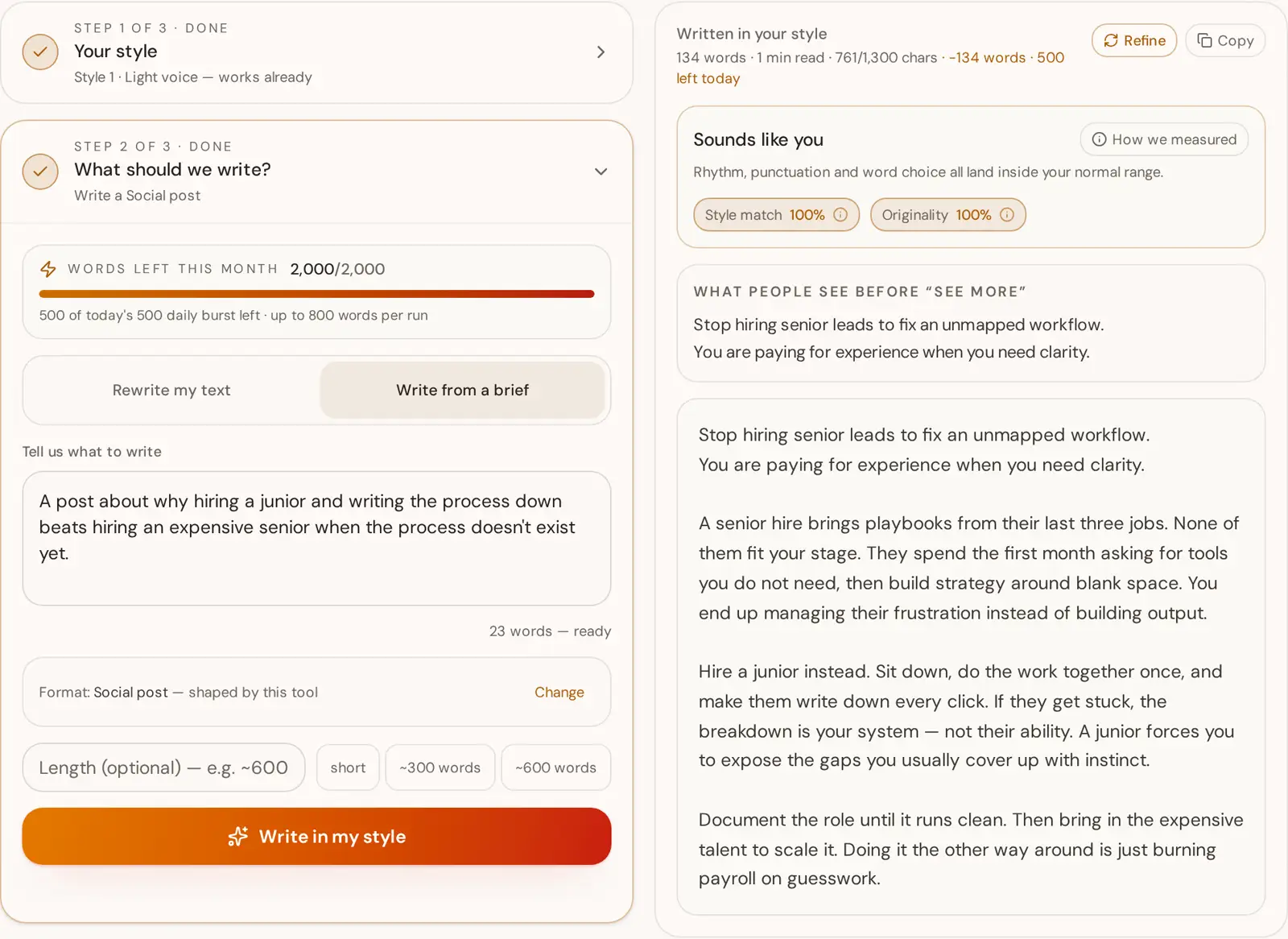
Why most AI LinkedIn posts get scrolled past
A LinkedIn post is read in two stages. Stage one is the two lines that appear in the feed before the "see more" cut; stage two only happens if those lines earned it. Generic AI generators write for stage two — they open with context, throat-clearing and a promise of five lessons, which means the part that would have made someone stop scrolling is buried where nobody sees it. Getting this right is mostly structural, not stylistic: put the sharpest concrete claim first and let the explanation follow.
The second problem is uniformity. Language models default to sentences of similar length, similar structure and a comfortable level of abstraction. Human posts are lumpy — a three-word sentence next to a twenty-five-word one, a specific number, a name, an unfinished thought. That lumpiness is what readers recognise as a person. It is also measurable, which is why this tool builds a style profile from your own posts first: average sentence length, how much that length varies, punctuation habits, contraction rate, how often you start a sentence with "and" or "but", how abstract your vocabulary runs.
Generation then works against those numbers rather than against a vague instruction to "sound casual". The draft is scored twice before you see it. Style match tells you how close the output landed to your measured profile. Originality checks the draft against your own samples, so a high score means the post carries your voice rather than recycled sentences from the posts you pasted — the failure mode nobody talks about, where a style tool quietly hands you back your old material rearranged.
None of this replaces having something to say. The generator needs an idea, a story or a number from you; what it removes is the twenty minutes of restructuring between having the thought and having a post that survives the feed. If the brief is empty, the output will be competent and forgettable, which is exactly what every other generator produces on a good day.
Who this is for
Founders posting under their own name, ghostwriters running several client voices, creators who post daily and B2B marketers whose personal reach outperforms the company page. All four share the same constraint: the writing has to be recognisably theirs, or it costs them the audience it was meant to reach.
What it is not
It is not an AI-detector bypass, not a scheduler and not an autopilot. There is no LinkedIn integration: you read the draft, edit what you disagree with, and post it yourself. It also won't invent numbers, quotes or results — anything factual has to come from your brief.
How the character limit is handled
LinkedIn truncates at roughly 1,300 characters. The draft targets 90–220 words to stay under that with room for line breaks, the live counter shows how much of the budget you've used, and if a post runs long you can shorten it to fit in one tap instead of guessing which paragraph to cut.
Further reading
- LinkedIn: best practices for creating contentLinkedIn's own guidance on post structure and length — the reason this tool optimises the opening lines rather than the total word count.
- Nielsen Norman Group: how people read onlineReaders scan rather than read, which is why front-loading the point beats building up to it in a feed.
- Plain-language writing guidelines (plainlanguage.gov)Short sentences, concrete nouns and active verbs — the same measurements the style profile scores your posts against.
Four tells of generic AI linkedin post output
Announcement throat-clearing: "I'm thrilled to share", "Excited to announce", "Reflecting on my journey." The first line spends itself on your feelings instead of the news.
How we fix it: Open on the change, the number or the decision. Feelings can appear in line four, once someone has a reason to keep reading.
The numbered lesson list: "Here are 5 key takeaways" followed by five interchangeable abstractions that would fit any industry.
How we fix it: Keep one takeaway and pay for it with a specific detail — what it cost, what broke, what you did on Tuesday.
Uniform rhythm: eight sentences of roughly equal length, each a complete tidy clause, no fragments.
How we fix it: Let sentence length swing. A three-word line after a long one is how a person writes, and it is the metric the style profile measures most directly.
Abstraction stacking: "leveraging authentic leadership to drive meaningful impact in a dynamic landscape." Every noun is a category rather than a thing.
How we fix it: Replace each abstract noun with something you could photograph — a deal, an inbox, a pricing page, a person's job title.
The engagement-bait close: "Thoughts? 👇" bolted onto a post that already made its point.
How we fix it: End with either a takeaway or a real question you actually want answered — never both, and never a question you wouldn't ask in a conversation.
What makes a great LinkedIn post
- The first two lines are the whole game — they're all that shows before “see more”.
- Keep it under roughly 1,300 characters so the post never gets truncated.
- Short paragraphs and line breaks: dense blocks get scrolled past on mobile.
- One idea per post, one clear takeaway or question at the end.
- Three to five relevant hashtags at most; more reads as spam.
What people write with it
Turn a rough idea into a hook-first post
You have one line in your notes app and no time to shape it. Describe the idea in a sentence and the generator builds the post around it, putting the sharpest part in the first two lines where LinkedIn actually shows it.
Rewrite a blog paragraph as a LinkedIn post
Long-form copy dies on LinkedIn because the payoff sits in paragraph four. Paste the section you want to repurpose and get it restructured into short paragraphs with the conclusion pulled to the top.
Write a hiring post that doesn't read like a job ad
Job-ad language kills reach because nobody shares a requirements list. Describe the role and the kind of person you want, and the post comes back in your own voice with the human reason for the hire in front.
Ghostwrite in a client's voice, not yours
Paste the client's own posts as the style sample and save it as a named profile. Every post you draft for them starts from their sentence length and phrasing, and the Style match score tells you how close you landed before you send it for approval.
Announce a launch without the corporate throat-clearing
"Thrilled to announce" is the single most ignored opening on the platform. Describe what shipped and who it helps, and the draft opens on the change rather than on your excitement about it.
Recap an event while it's still relevant
Event posts have a two-day shelf life, so speed matters more than polish. Dump your notes into the brief and get a post that keeps one takeaway instead of listing every session you attended.
Questions
How is this different from a normal AI LinkedIn post generator?
Most tools write in a generic LinkedIn voice. We build a measurable style profile from your own posts — sentence length, punctuation rhythm, vocabulary, tone — and generate against those numbers, then score how closely the result matches you.
How many past posts do I need?
Forty words is the minimum to unlock generation. Around 120 words gives a solid profile, and 300+ words gives high confidence.
Will it look AI-generated?
Every result gets an Originality score that checks it against your samples, and the model is blocked from reusing long sequences from them, so you get your voice rather than recycled sentences.
Is it free, and do I need to log in?
It's free with a free account: 5,000 words a month, and your style profiles are saved between sessions. Scanning a style and reading the analysis needs no account at all.
How long should a LinkedIn post be?
LinkedIn truncates at about 1,300 characters, so anything longer hides behind “see more”. This generator targets 90–220 words, which lands comfortably under that limit while still giving a story room to breathe.
Can I use it for ghostwriting a client's LinkedIn posts?
Yes — that's one of the main uses. Paste the client's own posts as the style sample and save it as a named style profile, so every post you write for them starts from their voice rather than yours.
Do you store my posts?
Your samples are used to build the style profile for the request. We don't keep your text for training.
Does it write hashtags?
Only when your own samples use them. If your posts carry hashtags, the draft ends with at most three relevant ones on their own line; if they don't, the post comes back clean, because copying a habit you don't have is the fastest way to sound like someone else.
Does it post to LinkedIn for me?
No. It writes the draft and you paste it into LinkedIn yourself. There is no LinkedIn connection, no posting permission and no scheduling, which also means nothing is published in your name without you reading it first.
Can it copy someone else's LinkedIn voice?
Technically it will clone whatever sample you paste, so ghostwriters use client posts with permission. Pasting a stranger's posts to impersonate them is a bad idea and against the spirit of the tool — the point is to sound like yourself faster, not to sound like somebody else.
How this works, in full
Related tools
Keep your style in one place
A free account gives you 5,000 words a month and up to 10 saved style profiles. Writing needs an account — scanning a style doesn't.